Sign-off built into the document
Typed or drawn signatures with a permanent audit record
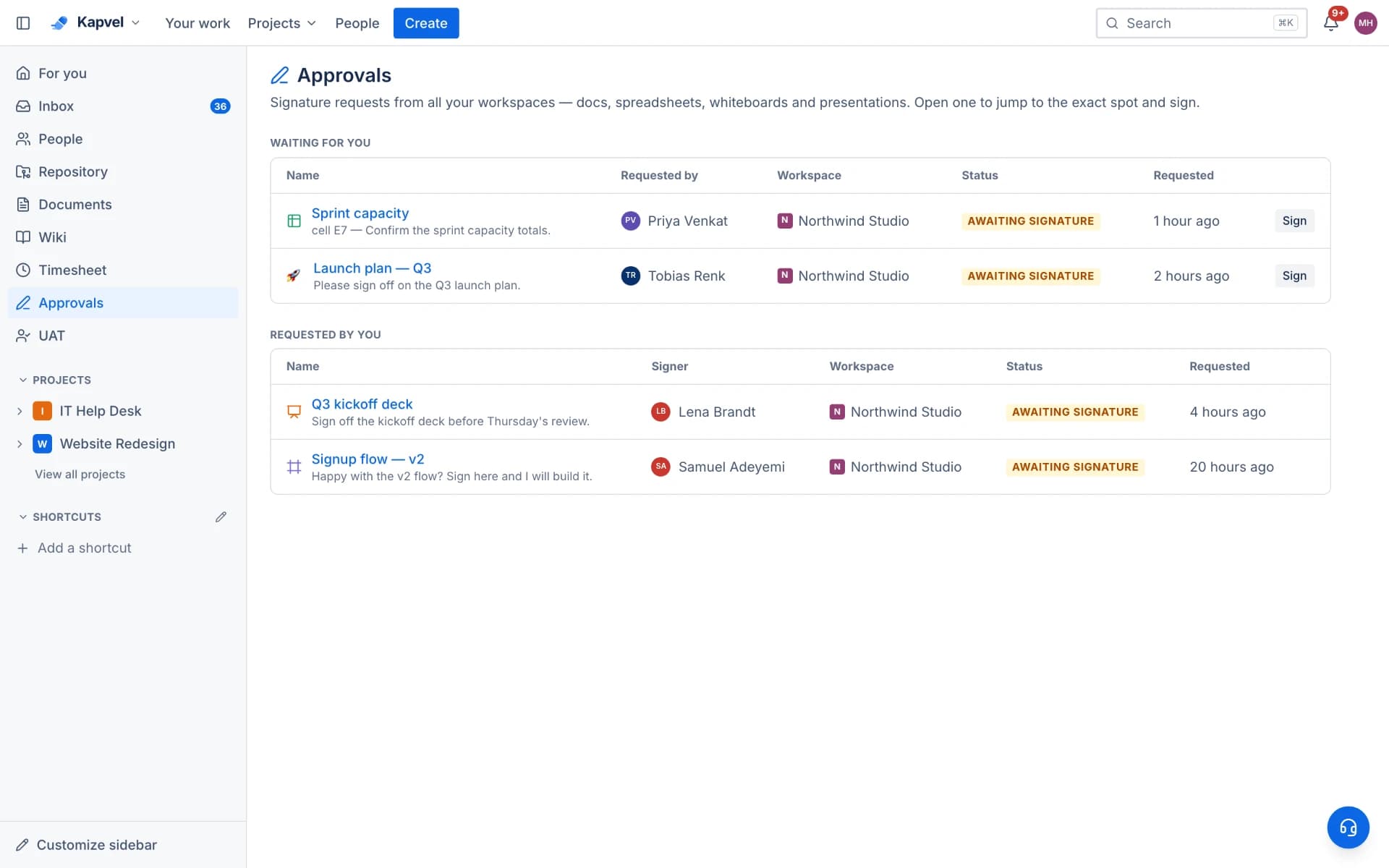
Specs, budgets, and launch plans all end with the same question: who approved this? Kapvel bakes approvals into every doc type. Request a signature from a teammate, anchor it to a page, a spreadsheet cell, a whiteboard element, or a slide, and the decision — with the signature image and timestamps — is stored permanently.
Anchored where it matters
Approvals are not a generic checkbox. Anchor a request to the exact artifact: the budget total in a spreadsheet, the architecture diagram element on a whiteboard, the final slide of a client deck, or an inline chip inside a page. Reviewers see precisely what they are signing.
Real signatures, real audit trail
Signers approve with a typed or hand-drawn signature. The record keeps requester, assignee, message, decision note, signature payload, and timestamps — an internal audit trail strong enough for compliance conversations, without per-envelope pricing.
In the flow of work
Requests appear in the assignee's inbox and the Approvals view with pending counts. Decisions notify the requester instantly. Because it all lives in the workspace, sign-off happens the same day instead of dying in email.
See it live
This is a real interactive demo — click around, nothing to install.
Statement of Work v3
Content locks the moment everyone signs.
Approvals · 2 required
Sign-off, signed for real
Request approval on any doc, spreadsheet, deck, or whiteboard. Approvers review the exact version, draw a real signature, and the content seals itself — no more “approved in Slack, changed on Monday”. Included with Premium, so there's no per-envelope e-signature bill.
- Works on docs, sheets, slides, and whiteboards
- Drawn signatures with a full who-signed-when audit trail
- Approved versions lock; new edits start the next version
- One Approvals inbox across the whole workspace
Frequently asked questions
Can approvals replace DocuSign?
For internal sign-offs — specs, budgets, design reviews, UAT acceptance — yes: signatures, audit trail, and anchored context, included in the Premium plan. For legally binding external contracts, dedicated e-signature services remain the right tool.
What can an approval be attached to?
Pages, spreadsheet cells, whiteboard elements, and presentation slides. The anchor deep-links reviewers to the exact spot.
Is there an audit record?
Every request stores requester, assignee, message, decision, signature (typed or drawn), and timestamps, immutably attached to the document.
Which plan includes approvals & e-signatures?
Approvals & e-signatures are a Premium feature. Client UAT sign-off with signatures is separate — it ships with the Testing add-on on Standard, so acceptance runs don't require Premium.
Keep exploring
Your team, out of eight tabs by Friday
Start free, invite the team, and import your existing projects in minutes. Boards, docs, and support — finally on speaking terms.